MSZ-LN sulatushuijaus

iro

Vakionaama
Jotain noita lueskelin, mutta missään ei tainnut olla yksilöllisempää tietoa. Pitää tänään yrittää avata ulkoyksikkö ja IPAlla puhdistaa tuo puu-adapterin liitin ja toivoa parasta. Samalla voisi tietty muista samassa rivissä olevista thermistoreista yrittää liittimiä puhdistaa.
Pystyykö IoT-datasta katsomaan missä tilassa Mitsurunnerin rele oli ongelman alkaessa? Tuosta voisi sitten päätellä onko mahdollinen vika lämpöanturi- vai huijausvastushaarassa.
Edit:
Jos näet Mitsurunnerin up-time:in niin varmista ettei Mitsurunner ole bootannut ongelman alkaessa.
 
Viimeksi muokattu:

yOlt

Jäsen
Pystyykö IoT-datasta katsomaan missä tilassa Mitsurunnerin rele oli ongelman alkaessa? Tuosta voisi sitten päätellä onko mahdollinen vika lämpöanturi- vai huijausvastushaarassa.
Edit:
Jos näet Mitsurunnerin up-time:in niin varmista ettei Mitsurunner ole bootannut ongelman alkaessa.

Uptime mukaan ainakaan edelliset kolme U4 erroria ei ole osunut samaan kohtaan kun uptime nollaantuu.
 

iro

Vakionaama
Uptime mukaan ainakaan edelliset kolme U4 erroria ei ole osunut samaan kohtaan kun uptime nollaantuu.
Ok, pyritään sulkemaan pois mahdollisia vian aiheuttajia. Epätodennäköinen syy mutta kun avaat ulkoyksikön niin varmista vielä että huijausadapterin johtimen on kytketty releeseen oikein.
 

yOlt

Jäsen
Ok, pyritään sulkemaan pois mahdollisia vian aiheuttajia. Epätodennäköinen syy mutta kun avaat ulkoyksikön niin varmista vielä että huijausadapterin johtimen on kytketty releeseen oikein.
Mitä tarkoitat "oikein"? On toiminut kuitenkin hyvin siitä asti kun loppukesästä asennettu.

Pystyykö tuon status mukaan päättelemään onko vika mahdollisesti tässä sulatushuijauksessa? Nyt pari vikaa kertaa osunut pian sulatuksen jälkeen.
 
Viimeksi muokattu:

iro

Vakionaama
Mitä tarkoitat "oikein"? On toiminut kuitenkin hyvin siitä asti kun loppukesästä asennettu.

Pystyykö tuon status mukaan päättelemään onko vika mahdollisesti tässä sulatushuijauksessa? Nyt pari vikaa kertaa osunut pian sulatuksen jälkeen.
Mietin sitä olisiko ulkoilman kylmyydellä vaikutusta vian esiintymiseen
* kosteuden kertyminen liitoksiin
* Ntc-anturin suurempi vastusarvo kylmässä
esim jos huijausvastus kytkeytyy ntc-kennoanturin rinnalle (ei tilalle) ja Mitsu tulkitsee tämän kylmässä ulkoilmassa anturivirheeksi.
"Oiken" tarkoittaa sitä onko johdot kytketty releen niille määritelltyihin liittimiin. Kuten totesin, epätodennäköistä mutta helppo tarkastaa kun kotelon avaa.

Sulatusvaiheen aikana (rele auki) Mitsurunner "näkee" NTC-anturin. Vika viittaisi tällöin Ntc-anturiin tai sen liitäntään.
Lämmitysvaiheessa rele on kiinni ja Mitsu "näkee" huijausvastuksen, tällöin vika liittyisi huijauvastukseen tai sen liitäntään.
 

iro

Vakionaama
Mitä tarkoitat "oikein"? On toiminut kuitenkin hyvin siitä asti kun loppukesästä asennettu.

Pystyykö tuon status mukaan päättelemään onko vika mahdollisesti tässä sulatushuijauksessa? Nyt pari vikaa kertaa osunut pian sulatuksen jälkeen.
Menemällä selaimella Mitsurunnerin web-serveriin pystyt manuaalisesti kääntelemään huijausrelettä. Voisit kokeilla muuttaa releen tilaa ja ja sitten odotella tuleeko Mitsun virhettä. (Kun muutoksien välissä pitää vähintään 10min tauon ei Mitsun eikä Mitsurunnerin pitäisi tuosta seota,) Mitsurunnerin tilakone myös aikanaan ohjaa releen tilamuutoksen mukaiseen asentoon
 

juu

Jäsen
Ennen Mitsurunneria veti noin 1h, runnerilla eka veto 1h45min. Ulkona -18 c. Seuraillaan.

Viime päivinä ollut reiluhko pakkanen mutta sulatuksissa vettä on kertynyt tosi vähän.
Screenshot 2025-01-07 at 23.00.43.jpg
 

ThingWizard

Jäsen
No problem, this is normal with IoT-Guru. After flashing EspHome-tool of your computer tries to make MQTT-connection with IoT-Guru server for log-messages. It fails because IoT-Guru does not accept several parallel connections having the same client-ID.

To avoid this kind of messages use command

esphome run --no-logs mitsurunner.yaml
@iro thanks so much, I'll try that!

UPDATE: I did that, but I still see the errors in the webserver interface, so it's not my home computer trying to push logs, the errors come up directly on the wemos. Am I missing something here?
mitsu.PNG
 
Viimeksi muokattu:

yOlt

Jäsen
Menemällä selaimella Mitsurunnerin web-serveriin pystyt manuaalisesti kääntelemään huijausrelettä. Voisit kokeilla muuttaa releen tilaa ja ja sitten odotella tuleeko Mitsun virhettä. (Kun muutoksien välissä pitää vähintään 10min tauon ei Mitsun eikä Mitsurunnerin pitäisi tuosta seota,) Mitsurunnerin tilakone myös aikanaan ohjaa releen tilamuutoksen mukaiseen asentoon

Ekan kerran kun tuo U4 tapahtui pakkasta oli yli 10 astetta. Seuraavilla kerroilla muutama aste pakkasta. Nyt ei ole kohta vuorokauteen tapahtunut ja lämpö ollut vähän plussalla.

Web-serveriltä eilen ilta muutamaan kertaan kääntelin sitä defrost prevention tilaa, mutta siitä ei ainakaan vielä tuota U4 seurannut.

Seurailen vielä ja katsotaan miten alkaa toistumaan kun taas pakastuu, mutta pitää varmaan ulkoyksikkö avata kun joskus valoisan aikaan ehtisi.

Edit: erehdyinkin sanomaan, nyt vähän ennen 8 u4 error. Ulkona +1,5. Laitan nyt kokonaan virrat pois 15 minuutiksi ja sitten käynnistän uudestaan.
 
Viimeksi muokattu:
  • Tykkää
Reactions: iro

puu

Aktiivinen jäsen
Ekan kerran kun tuo U4 tapahtui pakkasta oli yli 10 astetta. Seuraavilla kerroilla muutama aste pakkasta. Nyt ei ole kohta vuorokauteen tapahtunut ja lämpö ollut vähän plussalla.

Web-serveriltä eilen ilta muutamaan kertaan kääntelin sitä defrost prevention tilaa, mutta siitä ei ainakaan vielä tuota U4 seurannut.

Seurailen vielä ja katsotaan miten alkaa toistumaan kun taas pakastuu, mutta pitää varmaan ulkoyksikkö avata kun joskus valoisan aikaan ehtisi.

Edit: erehdyinkin sanomaan, nyt vähän ennen 8 u4 error. Ulkona +1,5. Laitan nyt kokonaan virrat pois 15 minuutiksi ja sitten käynnistän uudestaan.
Eipä sekään mahdotonta ole, että tuossa tekemässäni johtoadapterissa voisi olla vikaa. Siinähän tosiaan on samassa liittimessä sekä Defrost thermistor/RT61 että Discharge temperaturethermistor/RT62. Jos toisen noista kontakti pätkii, se voisi hyvinkin tehdä tuota vikaa, jonka kuvaus on tuo "open or short circuit in the outdoor unit thermistors".

Saatko tuolta sivujen 39-40 ohjeilla näkyviin noita virhekoodivilkutuksia?

Jos vilkuttaa tuon mukaista vilkutusta, vika liittyy hyvin todennäköisesti Mitsurunnerin kytkentään, eli siellä on oletettavasti vikaa joko adapterissa tai muussa kytkennässä. Mahdollisuudet ovat lähinnä joko vika adapterissa, tai releessä. Releen pitäisi tällöin tehdä niin, että vaihtoreleen molemmat puolet jäisivät auki, jolloin pumppu näkisi avoimen piirin anturin sijaan.

1736323983177.png
 
Viimeksi muokattu:

iro

Vakionaama
@iro thanks so much, I'll try that!

UPDATE: I did that, but I still see the errors in the webserver interface, so it's not my home computer trying to push logs, the errors come up directly on the wemos. Am I missing something here?
katso liitettä 103598
Sorry, my missunderstanding, I though that logs were coming through USB...
Mitsurunner is pushing traces and the PC tool is trying to read them (and with IoT-Guru reading fails). "no-log" in the compile command prevents reading, but Mitsurunner is still pushing traces to IoT-Guru.

But your case is interesting, no idea why you get MQTT-error via Mitsurunner WEB-server.
In my test environment, there are no MQTT-errors on Web-server logs and I'm wondering what the problem is in your system.

Which Mitsurunner version are you using?
Do you have multiple devices or sessions connected to IoT-Guru?

How you have set followig MQTT-parameters?
* topic_prefix: null # trace log is not send to IoT Guru server
* log_topic: null # no trace-logs over MQTT (function is not supported in IoT-Guru)
* discovery: false # HomeAssistant is not used

You could try what happens if you comment out line logger from platform.yaml file
 
Viimeksi muokattu:

yOlt

Jäsen
Eipä sekään mahdotonta ole, että tuossa tekemässäni johtoadapterissa voisi olla vikaa. Siinähän tosiaan on samassa liittimessä sekä Defrost thermistor/RT61 että Discharge temperaturethermistor/RT62. Jos toisen noista kontakti pätkii, se voisi hyvinkin tehdä tuota vikaa, jonka kuvaus on tuo "open or short circuit in the outdoor unit thermistors".

Saatko tuolta sivujen 39-40 ohjeilla näkyviin noita virhekoodivilkutuksia?

Jos vilkuttaa tuon mukaista vilkutusta, vika liittyy hyvin todennäköisesti Mitsurunnerin kytkentään, eli siellä on oletettavasti vikaa joko adapterissa tai muussa kytkennässä. Mahdollisuudet ovat lähinnä joko vika adapterissa, tai releessä. Releen pitäisi tällöin tehdä niin, että vaihtoreleen molemmat puolet jäisivät auki, jolloin pumppu näkisi avoimen piirin anturin sijaan.

katso liitettä 103607
Kiitoksia jotain tällaista kaipailinkin tulostin jo tuosta dokumentista oikeat sivut ja tutkin kun jossain vaiheessa ehdin tarkemmin asiaan perehtyä eiköhän näillä päästä vähän ongelman jäljille ja lähemmäs ratkaisua.
 

yOlt

Jäsen
Vielä meidän mitsurunnerista. Vertasin joulukuun 2023 ja 2024 ILP sähkön kulutusta (Nediksen älypistoke mistä menee sähkö sisä sekä ulkoyksikölle mittarina) suhteessa vastaavien ajankohtien lämmitystarvelukuihin. Ei ehkä huippu tieteellinen, mutta varmaan hyvin suuntaa antava. 2023 joulukuussa ILP kulutti suhteessa 75% enemmän sähköä verrattuna vuoden 2024 joulukuuhun milloin ei vielä mitsurunneria.

Muuten sama setuppi kiinteistön lämmityksessä ja arvelisin 2024 ennemminkin harvemmin takkaa polttaneeni, koska ILP toimii.
 

puu

Aktiivinen jäsen
Mitsurunner.com-wikissä voi tosiaan kuka tahansa muokata, jopa ilman kirjautumista. Jouduin lisäämään sinne captchan tapaisen bottieston, kun alkoi botteja tulvia. Se on kuitenkin helppo suomenkieliselle. Sinne voi myös tehdä tunnuksen, jolloin "captchaa" ei tarvitse tehdä joka muokkauksen jälkeen. Rekisteröinti kysyy oikeaa nimeä (näkyy käsittääkseni vain ylläpitäjälle), mutta sitä ei ole pakko laittaa. Selkeät botit siivoan tuolta pois käyttäjistä.

Olen siis tuon mitsurunner.com-sivun ylläpitäjä ja domainin haltija. Sivusto on mainoksista vapaa, eikä sillä ole kaupallisia intressejä. Käyttäjien tietoja ei kerätä eikä myydä. Sisältö on public domainia, eli vapaasti käytössä ja muokattavissa. Ainoa "mainos" tuolla on maininta siitä, että valmistan johtoadaptereita.

Tuolla on testisivu, millä vai harjoitella tuon dokuwikin käyttöä: https://mitsurunner.com/doku.php?id=fi:test
Tarkoitus on, että tuonne voi tehdä muokkauksia pienellä kynnyksellä, eikä muotoilun kanssa ole niin tarkkaa. Minä tai joku muu voi käydä korjailemassa jos sinne menee joku hassusti.
 

ThingWizard

Jäsen
Sorry, my missunderstanding, I though that logs were coming through USB...
Mitsurunner is pushing traces and the PC tool is trying to read them (and with IoT-Guru reading fails). "no-log" in the compile command prevents reading, but Mitsurunner is still pushing traces to IoT-Guru.

But your case is interesting, no idea why you get MQTT-error via Mitsurunner WEB-server.
In my test environment, there are no MQTT-errors on Web-server logs and I'm wondering what the problem is in your system.

Which Mitsurunner version are you using?
Do you have multiple devices or sessions connected to IoT-Guru?

How you have set followig MQTT-parameters?
* topic_prefix: null # trace log is not send to IoT Guru server
* log_topic: null # no trace-logs over MQTT (function is not supported in IoT-Guru)
* discovery: false # HomeAssistant is not used

You could try what happens if you comment out line logger from platform.yaml file
Which Mitsurunner version are you using?
-I believe i downloaded the latest zip from github (Code>Download.zip) so should be 0.9 as far as I can understand
Do you have multiple devices or sessions connected to IoT-Guru?
-Not to my knowledge. The only device talking to IoT-Guru should be the wemos... if not... hold on i wonder if i have something in nodered as well...

IT WAS NODERED! I was showing some info on my nodered dashboard! Thank you @iro !
But there should be a way to connect nodered with another id right? so that IotGuru doesn't get confused?

[Edit] I added _nodered to the client id in the nodered iotguru server settings and now it seems they are no longer colliding! :)
 
Viimeksi muokattu:

iro

Vakionaama
Which Mitsurunner version are you using?
-I believe i downloaded the latest zip from github (Code>Download.zip) so should be 0.9 as far as I can understand
Do you have multiple devices or sessions connected to IoT-Guru?
-Not to my knowledge. The only device talking to IoT-Guru should be the wemos... if not... hold on i wonder if i have something in nodered as well...

IT WAS NODERED! I was showing some info on my nodered dashboard! Thank you @iro !
But there should be a way to connect nodered with another id right? so that IotGuru doesn't get confused?

[Edit] I added _nodered to the client id in the nodered iotguru server settings and now it seems they are no longer colliding! :)
Another way to solve problem is to create dummy device to IoT-Guru and then use it's creditentials with Nodered's MQTT-connetion. It still has access to all topics under you account.
 

ThingWizard

Jäsen
Another way to solve problem is to create dummy device to IoT-Guru and then use it's creditentials with Nodered's MQTT-connetion. It still has access to all topics under you account.
Oh, ok! The ID_string modification seems to work though, and It's a bit easier (I'm lazy ;) )
NodeRed works so much better now as well of course, I kept wondering why i got disconnects there as well. Now the connection stays green both in NodeRed and on the Wemos. Nice! Thx again @iro!

This is what i did in the nodered connection setting:
1736420998797.png

Just for reference here if someone else happens to need it:

Step 2: Choose authentication​

We provide two authentication schemes to you, you can choose one of them or both of them.

User credentials​

Connect to MQTT server with your personal credentials and you can use it in a secure environment.

  • User name: user short identifier
  • Client id: user short identifier + something unique whatever
  • Password: your actual password

Device credentials​

Connect to MQTT server with one of your device credentials and you can use it in an insecure environment.

  • User name: user short identifier
  • Client id: device short identifier
  • Password: device key
 
Viimeksi muokattu:

ThingWizard

Jäsen
Mitsurunner.com-wikissä voi tosiaan kuka tahansa muokata, jopa ilman kirjautumista. Jouduin lisäämään sinne captchan tapaisen bottieston, kun alkoi botteja tulvia. Se on kuitenkin helppo suomenkieliselle. Sinne voi myös tehdä tunnuksen, jolloin "captchaa" ei tarvitse tehdä joka muokkauksen jälkeen. Rekisteröinti kysyy oikeaa nimeä (näkyy käsittääkseni vain ylläpitäjälle), mutta sitä ei ole pakko laittaa. Selkeät botit siivoan tuolta pois käyttäjistä.

Olen siis tuon mitsurunner.com-sivun ylläpitäjä ja domainin haltija. Sivusto on mainoksista vapaa, eikä sillä ole kaupallisia intressejä. Käyttäjien tietoja ei kerätä eikä myydä. Sisältö on public domainia, eli vapaasti käytössä ja muokattavissa. Ainoa "mainos" tuolla on maininta siitä, että valmistan johtoadaptereita.

Tuolla on testisivu, millä vai harjoitella tuon dokuwikin käyttöä: https://mitsurunner.com/doku.php?id=fi:test
Tarkoitus on, että tuonne voi tehdä muokkauksia pienellä kynnyksellä, eikä muotoilun kanssa ole niin tarkkaa. Minä tai joku muu voi käydä korjailemassa jos sinne menee joku hassusti.
Excellent, and a good reminder. I did some minor tweaks in the english section. I'll fix any errors I come across.
 
Viimeksi muokattu:

ThingWizard

Jäsen
Quick question, I just got the mitsurunner installed in the LN25. Do I need to manually turn the "Relay - defrost prevention" on in the web interface? Is it like a main switch? I first thought it would turn the relay on automatically since it is -6 but it didn't seem to do that so i switched on the relay manually. Is that correct?

1736430971854.png
 

iro

Vakionaama
Quick question, I just got the mitsurunner installed in the LN25. Do I need to manually turn the "Relay - defrost prevention" on in the web interface? Is it like a main switch? I first thought it would turn the relay on automatically since it is -6 but it didn't seem to do that so i switched on the relay manually. Is that correct?

katso liitettä 103642
"Relay - defrost prevention" shows the status of the relay. For testing purposes you can also switch relay on or off.
Normally Mitsurunner takes care of relay:)
 

ThingWizard

Jäsen
"Relay - defrost prevention" shows the status of the relay. For testing purposes you can also switch relay on or off.
Normally Mitsurunner takes care of relay:)
Okay, so there is no need to manually switch the logic on, it's always on :) Perhaps there was a small delay or something that made it not engage immediately. I have ran it now for about 3 hours and it seems during that time it has done one defrost. Strangely enough while the state was "idle", according to my logging. That makes no sense to me so I'll continue watching it :) Been staring at the StateMachine.pptx for a while now and start to wonder if i connected the relay correctly ;) It tested out fine using the test code. Just wonder if i wired it backwards or something... or everything is okay. I don't know ;P

1736440901070.png


[EDIT] I did a manual defrost trigger and that worked so I think all is ok
 
Viimeksi muokattu:

Kidov

Jäsen
... ... I have ran it now for about 3 hours and it seems during that time it has done one defrost. Strangely enough while the state was "idle", according to my logging. That makes no sense to me so I'll continue watching it :)
The first defrost has been hard coded to Mitsubishi's own fuzzy logic. It happens every time after the heatpump has been turned off and back on.
 

iro

Vakionaama
Okay, so there is no need to manually switch the logic on, it's always on :) Perhaps there was a small delay or something that made it not engage immediately. I have ran it now for about 3 hours and it seems during that time it has done one defrost. Strangely enough while the state was "idle", according to my logging. That makes no sense to me so I'll continue watching it :) Been staring at the StateMachine.pptx for a while now and start to wonder if i connected the relay correctly ;) It tested out fine using the test code. Just wonder if i wired it backwards or something... or everything is okay. I don't know ;P

katso liitettä 103670

[EDIT] I did a manual defrost trigger and that worked so I think all is ok
From Mitsurunner's perspective, the most interesting "curve" is topic_outdoor: outdoor_temperature. Based on that, Mitsurunner controls the relay's switching off. So you could included it to the items you follow-up.
 

ThingWizard

Jäsen
From Mitsurunner's perspective, the most interesting "curve" is topic_outdoor: outdoor_temperature. Based on that, Mitsurunner controls the relay's switching off. So you could included it to the items you follow-up.
Everything seems to work just fine now! Thanx for all your work, this solution is great. Why Mitsubishi doesn't do the same originally is beyond me.

It's interesting to see how the dew point is crucial for frost buildup. It's very clear that as dew point is reached frost buildup starts and the exchanger temps plummet. I'm going to experiment with adding a dew point calculation as reference in grafana, just to have some idea of the "dew point delta" so to speak. The higher dew point delta from exchanger temp, the longer it's going to run.
 

juu

Jäsen

ThingWizard

Jäsen
Shelly mittaa ilpin johdosta ottotehoa ja lähettää Iotguruun MQTT:llä. Tää on peruja ajalta ennen Mitsurunneria - nyt tekisin osaksi Mitsurunneria.

Jos Shellyllä halua tehdä niin mikä tahansa energy meter -shelly toimii, esim. PM Mini. https://www.shelly.com/collections/...nding&filter.v.price.gte=&filter.v.price.lte=
Thanx! Yeah, would be nice to add some amp probes to the mitsurunner while it's already there in the pump. I read here somewhere that someone made a fork of mitsurunner that had the ability to log power consumption as well. I need to look into that. Would be really nice to get it logged!

EDIT2: No nii, kaks PM mini Gen3 ostettu ;P I'm a bit too lazy to start excavating the mitsurunner from the heatpump now that I finally got it installed :)
 
Viimeksi muokattu:

iro

Vakionaama
Thanx! Yeah, would be nice to add some amp probes to the mitsurunner while it's already there in the pump. I read here somewhere that someone made a fork of mitsurunner that had the ability to log power consumption as well. I need to look into that. Would be really nice to get it logged!

EDIT: Tuo Shelly kyllä näyttää näppärältä! Oletko sieltä ostanut, tuleeko EU:sta?
EDIT2: No nii, kaks PM mini Gen3 ostettu ;P I'm a bit too lazy to start excavating the mitsurunner from the heatpump now that I finally got it installed :)
Just keep Mitsurunner as it is and configure Shelly to send power_data to your server. If you are using IoT-Guru some Shelly skrips are needed. Below is links to discussions how to do it. In Finnish of course;D


juu

Jäsen
Just keep Mitsurunner as it is and configure Shelly to send power_data to your server. If you are using IoT-Guru some Shelly skrips are needed. Below is links to discussions how to do it. In Finnish of course;D


No need for Shelly scripts, data can be sent with builtin Shelly MQTT to Iotguru too.

Here is Shelly MQTT settings for sending to IOTguru:
mqtt.iotguru.cloud:1883
User: IOT guru > account > user:
Custom prefix: userid / device short id / node short id
clean,
retain
password: device key
 

ThingWizard

Jäsen
No need for Shelly scripts, data can be sent with builtin Shelly MQTT to Iotguru too.

Here is Shelly MQTT settings for sending to IOTguru:
mqtt.iotguru.cloud:1883
User: IOT guru > account > user:
Custom prefix: userid / device short id / node short id
clean,
retain
password: device key
Thank you so much @iro and @juu! (I understand most finnish, if not there is always chatgpt to translate :) Kirjoittaminen on hankalampi)

Oh it has built in MQTT that's handy! - has the topic length issue been fixed then?

I also have a local nodered server an influx database and a grafana server running here so I might interface the shelly through nodered. I'll see what works best. I haven't used MQTT before i set up mitsurunner because for nodered i have mostly been using modbus to interface my Nibe ground heat pump. (kalliolämpö)

There seems to be active node-RED development for shelly nodes here https://flows.nodered.org/node/node-red-contrib-shelly
 
Viimeksi muokattu:

iro

Vakionaama
No need for Shelly scripts, data can be sent with builtin Shelly MQTT to Iotguru too.

Here is Shelly MQTT settings for sending to IOTguru:
mqtt.iotguru.cloud:1883
User: IOT guru > account > user:
Custom prefix: userid / device short id / node short id
clean,
retain
password: device key
I'm not so familiar with Shelly...
My Shelly get connected to IoT-Guru-MQTT and IoT_Guru server gets json-messages from Shelly.
But (I think) IoT-Guru can't handle json-messages for updateing database and grafs. So how to configure Shelly to send separate "topic-spesific" MQTT-message in plain-text?
 

iro

Vakionaama
Thank you so much @iro and @juu! (I understand most finnish, if not there is always chatgpt to translate :) Kirjoittaminen on hankalampi)

Oh it has built in MQTT that's handy! - has the topic length issue been fixed then?

I also have a local nodered server an influx database and a grafana server running here so I might interface the shelly through nodered. I'll see what works best. I haven't used MQTT before i set up mitsurunner because for nodered i have mostly been using modbus to interface my Nibe ground heat pump. (kalliolämpö)

There seems to be active node-RED development for shelly nodes here https://flows.nodered.org/node/node-red-contrib-shelly
If you have a local MQTT server, influx, and Grafana up-and-running, you can use them instead of IoT-Guru. I would say local solution is much more flexible than IoT-Guru.
 

ThingWizard

Jäsen
If you have a local MQTT server, influx, and Grafana up-and-running, you can use them instead of IoT-Guru. I would say local solution is much more flexible than IoT-Guru.
I don't have a local MQTT server up, but maybe I should get one running. Thanx for the tip.
Ja taas kiitos paljon, olen niin iloinen että pumppu nyt toimii niinku pitäis! Käy niiku kello, mutta ei typerän Mitsun ajoituksen perusteella. ;)
1736611198995.png
 

Kommressori

Tulokas
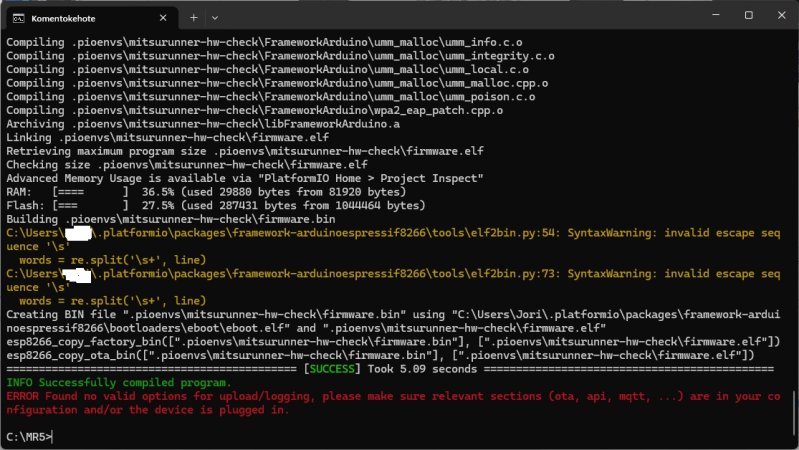
Tuohon jää toi hw_check. Ei ole oikeen kokemusta tästä esphomesta yms niin noin 5 tuntia kokeiltu vähän kaikkea mahdollista, 2 eri runneria ja 2 eri koneella.
 

Liitteet

  • esp.jpg
    esp.jpg
    256,7 KB · Katsottu: 66

juu

Jäsen
Tuohon jää toi hw_check. Ei ole oikeen kokemusta tästä esphomesta yms niin noin 5 tuntia kokeiltu vähän kaikkea mahdollista, 2 eri runneria ja 2 eri koneella.
Oletko asentanut D1 Minin/muun käyttämäsi alustan USB-serial-ajurin?

D1 minin piiri on yleensä CH340, ajuri valmistajan sivuilla:
windows https://www.wch-ic.com/downloads/CH341SER_ZIP.html
mac https://www.wch-ic.com/downloads/CH341SER_MAC_ZIP.html
Chip Model Support:
CH340/CH341/CH343/CH9101/CH9102/CH9143 (USB to Single Serial Port)
CH342/CH344/CH347/CH9103/CH9104 (USB to Multi Serial Ports)

Ja/tai sitten hw_checkistä et ole muokannut näitä kohtia
wifi:
# EDIT HERE: SSID and PASSWORD: Set your WiFi name and password
ssid: "ssid"
password: "pw"

manual_ip:
# Mitsurunner's IP address
static_ip: 192.168.1.100
subnet: 255.255.255.0
gateway: 192.168.1.1

# Logs on
logger:

# EDIT HERE: PASSWORD: Choose and fill in secure OtA update password
ota:
- platform: esphome
password: "0tapazzzwordz"
 
Viimeksi muokattu:

iro

Vakionaama
Tuohon jää toi hw_check. Ei ole oikeen kokemusta tästä esphomesta yms niin noin 5 tuntia kokeiltu vähän kaikkea mahdollista, 2 eri runneria ja 2 eri koneella.
Onko käyttämäsi hw_check viimeisin githubista löytyvä (päivitetty 6 months ago) ?
Kokeilin ajaa tuon ilman muutoksia omassa koneessani, kääntyi ja flashaytyi ongelmitta.
(Tuo versio ei käytä WiFiä joten @juu :n komentti ei enää tässä versiossa ole relevantti)
Jostakin syystä sinulla linkkeri antaa keltasen "invalid escape" varoituksen, en osaa sanoa onko tuolla merkitystä.
Jos rivinumerot vastaavat uusinta hw_check versiota varoitukset viittaavat allamainittuihin koodiriveihin. Kokeile ottaa githubista puhdas hw-check ja kokeile kääntyykö se ilman warningeja.

Koodi:
# Temperature sensor (Dallas DS18B20)
one_wire:
  - platform: gpio
    pin: $dallas_pin
#    pin: D3  # dallas_pin    <== Varoitus viittaa tähä riviin

Koodi:
# Relay PIN
switch:
  - platform: gpio
    pin: $relay_pin
    name: "rele"           <==Varoitus viittaa tähä riviin
    id: gpio_rele


Punainen ERROR: Found no valid... kertoo että ei löydy flashattavaa laitetta, eli USB-yhteys ei toimi. Kanttaa tsekata @juu : maintsema USB-ajuri.
 
Back
Ylös Bottom